CALMET 99 Simulation Software in Meteorological Education
Presentation
A traditional teaching approach of physical processes,
based on its mathematical representation, does not necessarily attain successful
learning.
Students sit in basic courses of Physics and Mathematics
in the Facultad de Ciencias Exactas y Naturales of the Universidad de Buenos
Aires. Biology students take the Bioclimatology Course on their fourth
university year, and usually by then, they "have forgotten the physical-mathematical
reasoning" taught in previous physics and math courses. They do not hold the understanding of physical processes through
their abstract representation.
Meteorology and Oceanography students study general concepts of physics,
algebra, calculus and physical laws of the atmospheric motions, approximations
and simplified models of the weather and climate phenomena during their basic cycle. The complex
equations systems and the big quantities of variables make difficult to handle equations through manual
calculation. Students act as "formula manipulators"
missing physical concepts. Often, they acquire a quantitative knowledge
of meteorological concepts without the necessary conceptual comprehension
that enables a real understanding.
 It is interesting to
analize an example given by Gardner (
1993), about DiSessa's computerized game. The player gives orders to a ¨dinaturtle¨ that moves and has to kick a ball. Students have to apply Newton's laws to win the game, they have to predict how the turtle moves after kicking the ball. Their common belief is that objects always move in the direction of the most recently applied force.
Elementary school students
and Physics university ones failed to take into account the speed of an object in motion when trying to predict how the application of an impulse force would affect its trajectory. Both groups used the same strategies unrelating the game with the physical laws studied before. Students applied their previous
ideas, only after they repeatedly failed to win the game with their misconceptions, they
used the physical laws. To remember demonstrations,
definitions and equations seems to be enough to assess an exam, but is not
sufficient to invoke the physical learning applied to a particular case.
Teaching practices should therefore point toward this direction.
It is interesting to
analize an example given by Gardner (
1993), about DiSessa's computerized game. The player gives orders to a ¨dinaturtle¨ that moves and has to kick a ball. Students have to apply Newton's laws to win the game, they have to predict how the turtle moves after kicking the ball. Their common belief is that objects always move in the direction of the most recently applied force.
Elementary school students
and Physics university ones failed to take into account the speed of an object in motion when trying to predict how the application of an impulse force would affect its trajectory. Both groups used the same strategies unrelating the game with the physical laws studied before. Students applied their previous
ideas, only after they repeatedly failed to win the game with their misconceptions, they
used the physical laws. To remember demonstrations,
definitions and equations seems to be enough to assess an exam, but is not
sufficient to invoke the physical learning applied to a particular case.
Teaching practices should therefore point toward this direction.
Use of the software
The use of visually oriented software for simulating dynamic
systems is proposed to provide students with a better comprehension of
the concepts. This software supplies a rich set of visual tools for making
explicit the structural relationships that reflect the behaviour of a dynamic
system.
Martin (1997) defines
computer simulation as the imitation of system behaviour through numerical
calculations performed by a computer on a system dynamics model that represents
the structure of the system.
The computer simulation program provides a framework
and an easy-to-understand graphical interface for observing the quantitative
interaction of variables within a system. The key idea underlying this approach is the notion that
complex phenomena can be better understood by examining the behaviour of
the system and how it changes over time. One of the advantages of the modelling dynamic software
is the ease with which both the structures of the model and its parameters
can be examined and modified by the user.
In a simulation, students specify the initial conditions
and the computer shows the behaviour of the different model variables over
time. Simulation gives students the power to analyse the behaviour of the
system under many different conditions. Using pre-built models, students
manipulate individual parameters of the model and then observe subsequent
changes among other variables in the system. Building a model, students
must decide which variables are important, identify the causal relationships
between the variables, quantify those relationships, and test the validity
of their model.
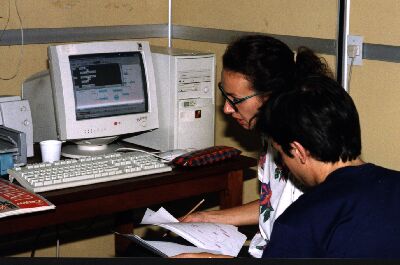
By approaching problems with a computational model, the
concepts can be introduced qualitatively and decoupled from the mathematical
background necessary for the closed analytic form solution. Thus, modelling
provides an opportunity for students to express their own conceptual understanding
of physical phenomena, using visual representations of both, quantities
and their causal relationships.
The power of simulations created for the purpose of facilitating
conceptual change is linked to choices made about which objects, objects
attributes, and relations of the referent domain will actually be represented
on the screen, the way they are represented and controlled in the simulation
(Snir, Smith and Grosslight, 1995). In this
case the software is controlled by the mathematical relationships embedded
in the structure.
Description of the software
The computer simulation program provides a framework and
an easy-to-understand graphical interface for observing the quantitative
interaction of variables within a system. The interface is a window used
for constructing new models, or for modifying, navigating, and simulating
existing models. The structural elements of the model are created with
four basic building blocks: the stock, the flow, the converter and the
connector. The connections among the blocks define the causal relationships
and feedback loops among model variables and the initial conditions for
the starting state of the model. One of the advantages of the software
is the ease with which both the structure of the model and its parameters
can be examined and modified by the user.
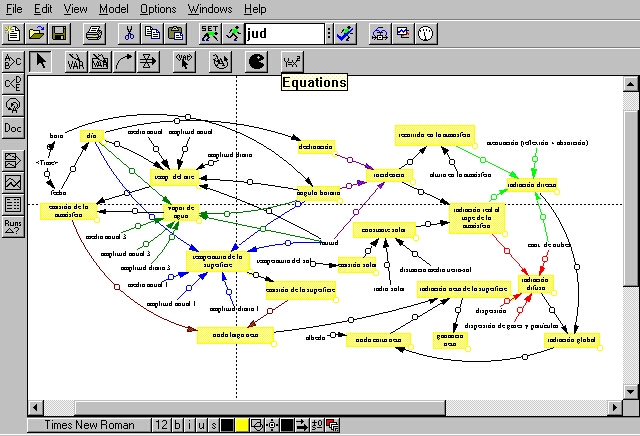
The stock or level icon is a generic symbol for anything
that accumulates or drains. The flow represents the rate at which the stock
increases or decreases. Flows fill or drain stocks, the flow can be uni-directional
or bi-directional and the flow within the system can be either conserved
or non-conserved. Converters are used to make explicit the details of the
logic that controls a flow regulator. They can hold constants, define external
inputs to the model, and calculate algebraic relationships using built-in
functions and graphical functions. The final building block is the connector,
which links the components in the model to each other. The symbol "cloud"
defines the boundaries of the model. They define what is relevant to consider,
and what is not. In this case, we used VensimPLE 32, an academic free version
available in Internet.
Multiple representations
The visual interface of the diagram window has particular
importance as a "conceptual representation of the model" that supports
the expression of students' own ideas and, at the same time, allows them
to experiment with those ideas. Students must make explicit their own understanding
of the structure of the system and the underlying causal relationships.
The underlying activity involved in modelling is to formulate, test and
revise hypothesis about relationships within a system.
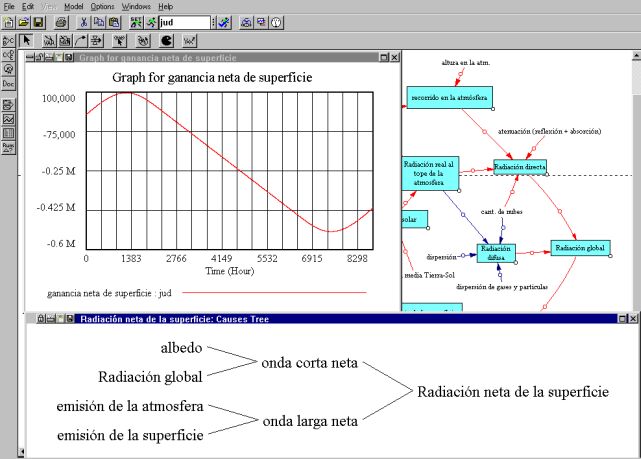
The software generates multiple representations of the
modelled system since the analysis tools review tree-type graphical representation,
equations, definitions, and units of measure for the whole model and display
the results of a simulation run over time as a graph and a table of values.
The multiple-linked representations help: enriching dialogue with self,
raising conflict and surprise, affirming (if not paralleling) students'
expressed models and the ones they act on (Goldenberg,
1995).
Pedagogical innovations
The software enables a good comprehension of the concepts
if it is used to:
 confront student's
erroneous beliefs about physical phenomena with correct concepts through
active student's participation,
confront student's
erroneous beliefs about physical phenomena with correct concepts through
active student's participation,
apply theoretical
concepts learnt in class to problem-solving.
To reach this goals professors have to:
promote the students hands-on involvement that is essential to internalising
the ideas and establishing them as mental models,
change from
a role of central knowledge authority to one of guide and facilitator,
develop, implement
and support new teaching strategies.
Students have to:
have an active
attitude,
accept and practice the innovations profesors propose.

